Your Portail, your organisation
No more generic home pages. With Pristy Portail, every user has a dashboard that fits them.
Portail
Nouveauté
25.1
What is it for?
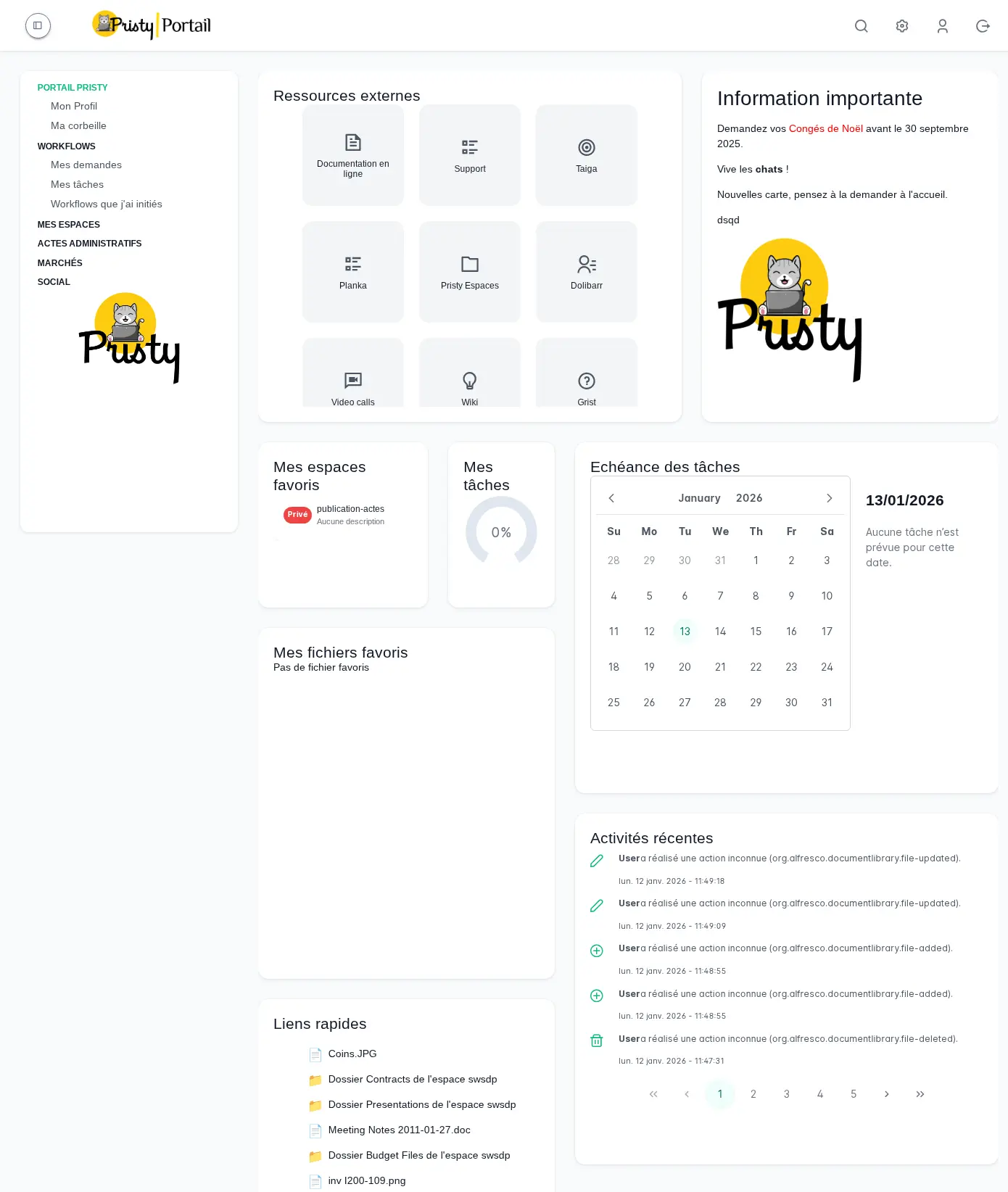
The Pristy Portail dashboard is a configurable starting space that replaces the generic home page with a personalised view — tailored to each user’s profile, department and habits.
Administrators compose template home pages by profile or department. Each user then chooses the configuration that suits them from the available templates, or creates their own. The available blocks cover common use cases:
- Recent documents — find your files without searching
- Favourites — quick access to pinned documents and spaces
- Activity feed — follow what is happening in your spaces
- External applications — integrate your business tools directly on the home page
- Links to organisation tools — shortcuts to your applications and internal services
- Markdown content — add free text, links, internal announcements
A mini-map makes navigation easier in more elaborate configurations.
How to use it?
From the administration menu, open the dashboard editor. Drag and drop blocks onto the grid, resize them and configure each one independently according to your needs.
Once your configuration is published, it appears in the users’ display options. Those who prefer to personalise can compose their own dashboard in a few minutes, using the same tools.
All modifications are versioned — a rollback is possible at any time, with no risk of losing an existing configuration.
The right information, from the moment you log in.
When should you use it?
Perfect for organisations that want to offer their staff a home portal tailored to their role: quick access to priority spaces, shortcuts to business applications, personalised activity feed.
A few concrete examples:
- Administrator — Create a different dashboard for each department: HR staff see their HR spaces, procurement teams see their active tenders, managers monitor their area’s activity.
- Management — Documents awaiting validation, recent activity and key indicators accessible as soon as Portail opens — no more navigating to get the overview.
- Field user — Each agent configures their display according to their habits: their priority spaces, their business shortcuts, their activity feed. A dashboard that looks like them.
- IT / IS department — All modifications are versioned and reversible. No risk of breakage during configuration changes.
How does it boost productivity?
A well-configured dashboard means several minutes saved at every login. Less navigation, fewer unnecessary clicks — the information is there, in the right place, as soon as Portail opens.
For organisations with varied profiles, it is also a driver of adoption: when each agent finds a familiar space on the home page, onboarding is faster and usage more regular.
Frequently asked questions
Can you have several different dashboards?
Yes. The administrator composes a reference configuration. Each user can adopt it as-is, or create their own according to their habits and priorities.
Can users modify their own dashboard?
Yes. Each user can compose their own dashboard by dragging and dropping the available blocks, independently of the reference configuration defined by the administrator.
How do you access the dashboard editor?
Via a dedicated new entry in the Pristy Portail administration menu.
Other recent features
- PDF consultation — Consultez vos pdfs facilement, qu'ils contiennent 2 ou 650 pages.
- Administration tools — Manage Alfresco data models, browse the repository and supervise your platform from Pristy Portail — no server access, no command line.
- Classification plan — Automatically structure your workspaces with the Pristy Espaces classification plan. Define document types and folder hierarchy — Pristy classifies on deposit, without interrupting activity.
- PDF editing tools — Edit your PDFs without leaving Pristy — reorder pages, redact, merge, sign. Directly from the viewer, versioned automatically.
Planned developments for this feature
There is always room for improvement! Here is what we have planned for the future of this feature:
- New block types
- Advanced workspace management directly from the dashboard
How to get Pristy
Order Pristy today and benefit from modern, intuitive document management
Pristy also includes Pristy Portal application that offers profile and user pages. Pristy Portail is included with the purchase of Pristy Actes and Pristy Espaces (solo or together). Pristy Portail can also be purchased on its own.
Go to our rates page to find out more. Request your quote now and take advantage of our low rates and the chance to give your opinion on future features!